
The End of Manually Reconciling Airport Invoices
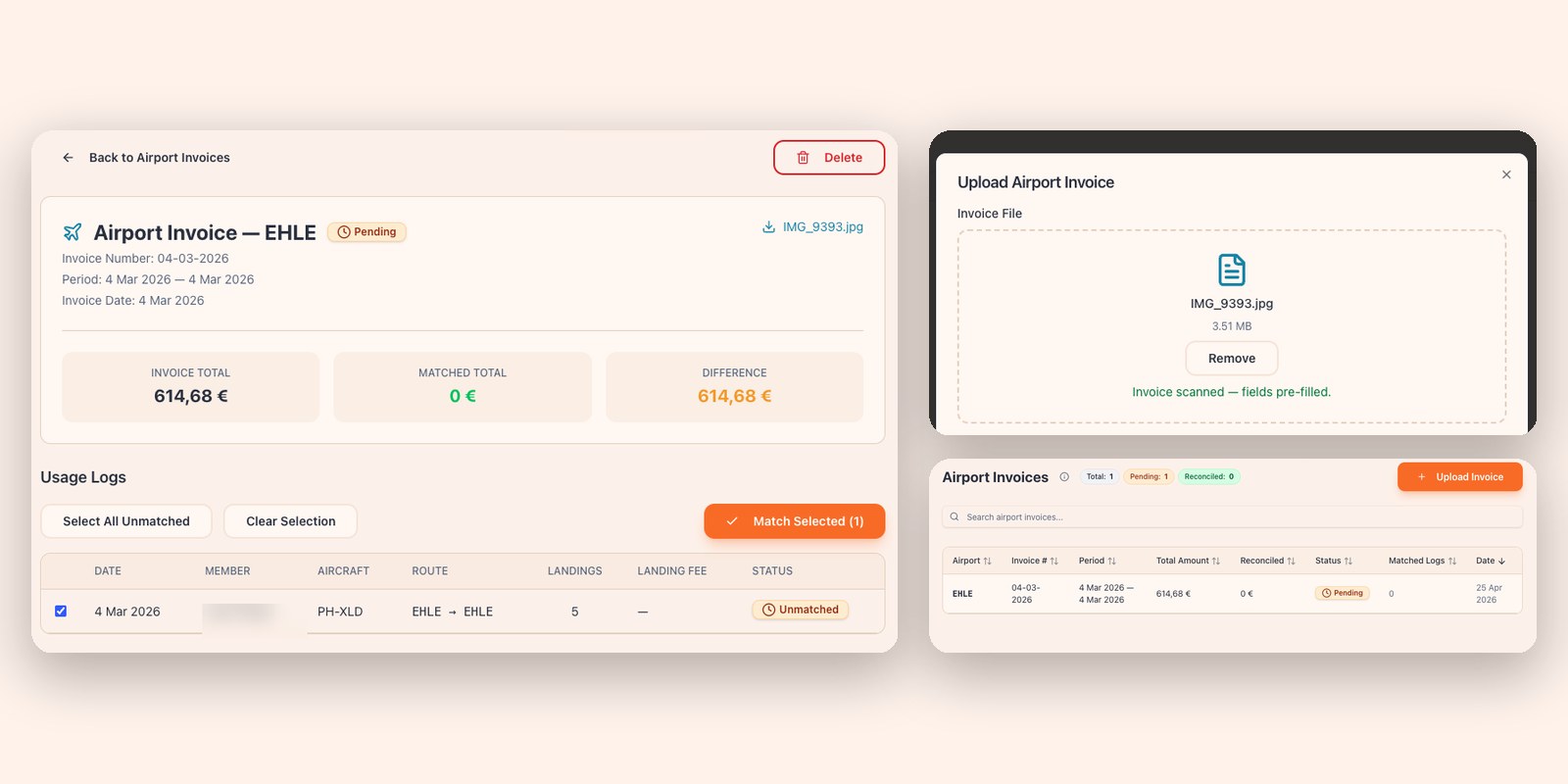
The treasurer of a flying club once told me their least favourite envelope of the month was the one from the airport. Inside: a multi-page landing fee invoice for the previous month. Forty-something landings spread across seven members, no flight numbers and no names — just dates, runway IDs, and amounts. Their job was to figure out who owed what, type it all into a spreadsheet, and then create a separate charge for each person. They blocked out a Saturday morning for it.
Multiply that by every airport the group flies to, plus the fuel bills, plus the hangar invoice, plus whatever the maintenance shop sent over, and you've found where most of the admin in a flying club actually goes. Not into managing the airplane. Into translating other people's PDFs into rows in their own spreadsheet.
What changed
Kai now has an automated invoice parser. Drop a PDF — or a photo of one — into the platform and it pulls out everything that matters: vendor, invoice number, date, line items, VAT, totals, currency. Then it does the part that actually saves time, which is matching each line back to a flight in your usage log.
There are two flavours of invoice it handles, because they work differently in practice.
Landing invoices
These are the airport bills. For airports where your group has an account, Kai already records the landing the moment a flight is logged. When the monthly invoice arrives, you upload the PDF and Kai matches each line back to the landing it already knew about. What you see is a clean reconciliation: this landing on this flight, charged to this member, paid for by this invoice. No retyping. No "wait, whose flight was the 14th at 11:23?" The numbers either line up — and you mark it reconciled — or Kai surfaces the mismatch so you can investigate.
If the airport's rates are time-of-day or weekend-dependent, the landing-fee calculator already knows that, so the invoice usually just confirms what Kai expected.
Third-party invoices
Everything else falls into the second category. Eurocontrol route charges. DFS air navigation fees. Fuel and oil bills. Maintenance shop invoices. Marina services, parking, hangar rent, the avionics check-up. None of these tie to a single landing, and the line items are usually messier than landing fees.
The Eurocontrol invoice is the canonical example. A monthly statement lists every IFR flight your aircraft made through European airspace, each with a service date and a route, charged at the unit rate of whichever country's airspace you crossed. The traditional approach is for someone on the board to sit down with the PDF and a spreadsheet of the group's flights and match them by hand.
Upload the PDF to Kai instead. It extracts every line — description, service date, amount, VAT rate — and for each item pulls up the usage logs from around that date (±1 day) so you can match it to the flight that caused it. You confirm the matches that look right, fix the ones that don't, and push the whole thing into the books. The same flow handles fuel deliveries, supplier invoices, and anything else where a date can tie back to a flight. Line items move through three states — unmatched, matched, processed — so at a glance you can see which invoices still need attention and which are fully accounted for.
Why this matters more than it sounds
Invoice retyping is the kind of admin that doesn't feel important until you stop doing it. It's the silent tax on running a shared aircraft — a few hours a month from someone who'd rather be flying — and it breeds errors. A transposed digit in a landing fee. A missed VAT line on a fuel bill. A member charged twice because two people were both "sure" they'd handled it.
Once invoices flow in as structured data rather than PDFs, two things change. The treasurer's Saturday mornings come back. And the books actually match reality — every charge is traceable to a real flight, a real invoice, a real line item. When someone asks why they're being charged €47 for a landing in Rotterdam, the answer is one click away.
Try it on your next bill
If you're already using Kai, the parser is in Expenses → Upload Invoice. Pick airport invoice or third-party invoice and drop the file in. PDFs and photos both work, up to 20MB. If you're not using Kai yet and this story sounds familiar — this is the kind of admin we built Kai to take off your plate.